一、什么是页?
1.定义
页是InnoDB存储引擎在磁盘上存储数据的一种逻辑结构,是管理数据和索引的基本单位,相当于一个容器,存放表中的记录、索引信息等。
mysql> show variables like 'innodb_page_size';
+------------------+-------+
| Variable_name    | Value |
+------------------+-------+
| innodb_page_size | 16384 | 16KB
+------------------+-------+
1 row in set, 1 warning (0.02 sec)
2.页的结构
以数据页的结构为例:
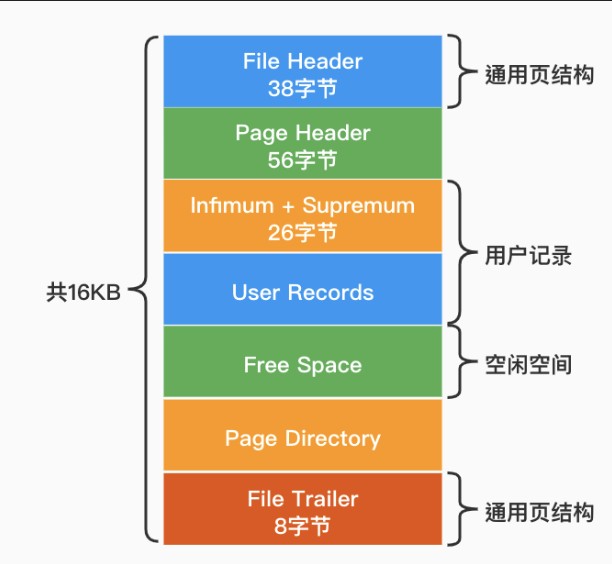
页目录通过分组+槽的方法进行高效的查找:
快速定位记录组:先通过二分查找找到对应的组;
组内线性查找:每个组内的数据不超过8个,超过8个重新分裂成一个组。
3.B+树在索引中的应用
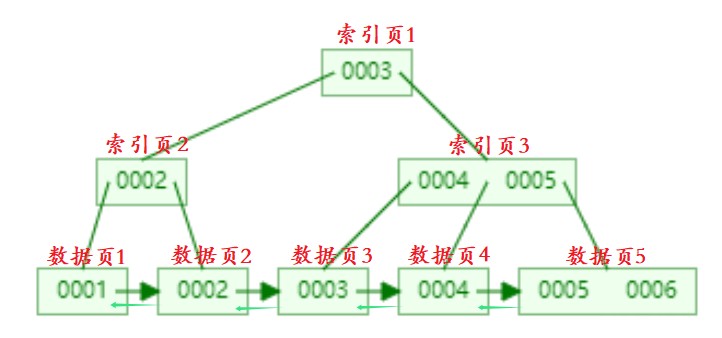
查找4为例:
二、索引的分类及使用
按功能特性分类:
普通索引
1.定义
最基本的索引,没有唯一性的限制,只是为了提高查询效率而创建的索引。可能为多列创建组合索引,称为复合索引或者组合索引。创建之后都会生成一颗索引树,创建多少索引生成多少棵索引树。
2.使用
-- 方式一:创建表时创建普通索引
mysql> create table class4(
    -> id bigint,
    -> name varchar(20),
    -> index(name));
Query OK, 0 rows affected (0.09 sec)
mysql> desc class4;
+-------+-------------+------+-----+---------+-------+
| Field | Type        | Null | Key | Default | Extra |
+-------+-------------+------+-----+---------+-------+
| id    | bigint(20)  | YES  |     | NULL    |       |
| name  | varchar(20) | YES  | MUL | NULL    |       |
+-------+-------------+------+-----+---------+-------+
2 rows in set (0.00 sec)
-- 方式二:修改为普通索引
mysql> create table class5(
    -> id bigint,
    -> name varchar(20));
Query OK, 0 rows affected (0.15 sec)
mysql> alter table class5 add index(name);
Query OK, 0 rows affected (0.11 sec)
Records: 0  Duplicates: 0  Warnings: 0
mysql> desc class5;
+-------+-------------+------+-----+---------+-------+
| Field | Type        | Null | Key | Default | Extra |
+-------+-------------+------+-----+---------+-------+
| id    | bigint(20)  | YES  |     | NULL    |       |
| name  | varchar(20) | YES  | MUL | NULL    |       |
+-------+-------------+------+-----+---------+-------+
2 rows in set (0.00 sec)
-- 方式三:创建索引并指定索引名:一定要指定索引名,否则创建失
mysql> create index idx_class5_id on class5(id);
Query OK, 0 rows affected (0.07 sec)
Records: 0  Duplicates: 0  Warnings: 0
mysql> desc class5;
+-------+-------------+------+-----+---------+-------+
| Field | Type        | Null | Key | Default | Extra |
+-------+-------------+------+-----+---------+-------+
| id    | bigint(20)  | YES  | MUL | NULL    |       |
| name  | varchar(20) | YES  | MUL | NULL    |       |
+-------+-------------+------+-----+---------+-------+
2 rows in set (0.00 sec)
索引的查询
语法
show keys from 表名;示例:

他有点长,后面我直接查看表结构来查看
唯一索引
1.定义
当在一个表中定义一个唯一键unique,索引值必须是唯一的,不可以存在重复值。
2.使用
方式一:创建时创建唯一键
mysql> create table class1(
    -> id bigint unique,
    -> name varchar(20));
Query OK, 0 rows affected (0.13 sec)
mysql> desc class1;
+-------+-------------+------+-----+---------+-------+
| Field | Type        | Null | Key | Default | Extra |
+-------+-------------+------+-----+---------+-------+
| id    | bigint(20)  | YES  | UNI | NULL    |       |
| name  | varchar(20) | YES  |     | NULL    |       |
+-------+-------------+------+-----+---------+-------+
2 rows in set (0.00 sec)
方式二:创建时指定唯一列
mysql> create table class2(
    ->  id bigint,
    -> name varchar(20),
    -> unique (id,name));
Query OK, 0 rows affected (0.06 sec)
-- 方式一和方式二的区别:
-- 方式一只能给单列加主键,而方式二支持复合主键
mysql>  desc class2;
+-------+-------------+------+-----+---------+-------+
| Field | Type        | Null | Key | Default | Extra |
+-------+-------------+------+-----+---------+-------+
| id    | bigint(20)  | YES  | MUL | NULL    |       |
| name  | varchar(20) | YES  |     | NULL    |       |
+-------+-------------+------+-----+---------+-------+
2 rows in set (0.00 sec)
方式三:修改为唯一索引
mysql>  create table class(
    ->  id bigint,
    -> name varchar(20));
Query OK, 0 rows affected (0.10 sec)
-- 修改方式1:
mysql> alter table class modify id bigint unique;
Query OK, 0 rows affected (0.04 sec)
Records: 0  Duplicates: 0  Warnings: 0
mysql> desc class;
+-------+-------------+------+-----+---------+-------+
| Field | Type        | Null | Key | Default | Extra |
+-------+-------------+------+-----+---------+-------+
| id    | bigint(20)  | YES  | UNI | NULL    |       |
| name  | varchar(20) | YES  |     | NULL    |       |
+-------+-------------+------+-----+---------+-------+
2 rows in set (0.00 sec)
mysql> create table class3(
    -> id bigint,
    -> name varchar(20));
Query OK, 0 rows affected (0.09 sec)
-- 修改方式2:
mysql> alter table class3 add unique(id,name);
Query OK, 0 rows affected (0.09 sec)
Records: 0  Duplicates: 0  Warnings: 0
mysql> desc class3;
+-------+-------------+------+-----+---------+-------+
| Field | Type        | Null | Key | Default | Extra |
+-------+-------------+------+-----+---------+-------+
| id    | bigint(20)  | YES  | MUL | NULL    |       |
| name  | varchar(20) | YES  |     | NULL    |       |
+-------+-------------+------+-----+---------+-------+
2 rows in set (0.00 sec)
主键索引
1.定义
当在一个表上定义一个主键primary key时,自动创建索引,索引的值是主键列的值,主键的索引的列值不能为空且必须唯一,InnoDB使用它作为聚簇索引。
2.使用
-- 方式一:创建表时直接创建主键
mysql> create table class1(
    -> id bigint primary key auto_increment,
    ->  name varchar(20));
Query OK, 0 rows affected (0.02 sec)
-- 方式二:创建表示单独创建主键列
mysql> create table class3(
    -> id bigint auto_increment,
    -> name varchar(20),
    -> primary key(id,name));
Query OK, 0 rows affected (0.11 sec)
-- 方式三:修改表中的列为主键值
mysql> create table class5(
    -> id bigint,
    -> name varchar(20));
Query OK, 0 rows affected (0.09 sec)
-- 修改方式1:
mysql> alter table class5 modify id bigint primary key auto_increment;
Query OK, 0 rows affected (0.11 sec)
Records: 0  Duplicates: 0  Warnings: 0
-- 查看修改后的表结构
mysql> desc class5;
+-------+-------------+------+-----+---------+----------------+
| Field | Type        | Null | Key | Default | Extra          |
+-------+-------------+------+-----+---------+----------------+
| id    | bigint(20)  | NO   | PRI | NULL    | auto_increment |
| name  | varchar(20) | YES  |     | NULL    |                |
+-------+-------------+------+-----+---------+----------------+
2 rows in set (0.02 sec)
mysql> create table class6(
    -> id bigint,
    ->  name varchar(20));
Query OK, 0 rows affected (0.10 sec)
-- 修改方式1:
mysql> alter table class6 add primary key(id,name);
Query OK, 0 rows affected (0.14 sec)
Records: 0  Duplicates: 0  Warnings: 0
mysql> alter table class6 modify id bigint auto_increment;
Query OK, 0 rows affected (0.09 sec)
Records: 0  Duplicates: 0  Warnings: 0
-- 查看修改后的表结构
mysql> desc class6;
+-------+-------------+------+-----+---------+----------------+
| Field | Type        | Null | Key | Default | Extra          |
+-------+-------------+------+-----+---------+----------------+
| id    | bigint(20)  | NO   | PRI | NULL    | auto_increment |
| name  | varchar(20) | NO   | PRI | NULL    |                |
+-------+-------------+------+-----+---------+----------------+
2 rows in set (0.00 sec)
三、索引的删除
语法
alter table class6 drop 索引名;示例:
-- 删除主键索引
-- 删除主键前,如果有自增属性,要先删除自增属性,否则删除主键失败
mysql> alter table class6 drop primary key;
ERROR 1075 (42000): Incorrect table definition; there can be only one auto column and it must be defined as a key
-- 删除自增属性:将自增属性修改为非自增属性
mysql> alter table class6 modify id bigint;
Query OK, 0 rows affected (0.07 sec)
Records: 0  Duplicates: 0  Warnings: 0
-- 删除自增属性
mysql> alter table class6 drop primary key;
Query OK, 0 rows affected (0.07 sec)
Records: 0  Duplicates: 0  Warnings: 0
-- 查看删除后的表结构
mysql> desc class6;
+-------+-------------+------+-----+---------+-------+
| Field | Type        | Null | Key | Default | Extra |
+-------+-------------+------+-----+---------+-------+
| id    | bigint(20)  | NO   |     | NULL    |       |
| name  | varchar(20) | NO   |     | NULL    |       |
+-------+-------------+------+-----+---------+-------+
2 rows in set (0.00 sec)
四、其他索引
全文索引:基于文本列(char、varchar、text)上创建,加快对些列中包含的数据查询和DML操作。
聚簇索引:
非聚簇索引:
索引覆盖:当一个select语句使用了普通索引且查询列表中的列刚好是创建索引时的所有或部分列,这是就可以直接返回,而不用回表查询。
到此这篇关于MySQL索引中的页及索引的分类及使用的文章就介绍到这了,
正文完